

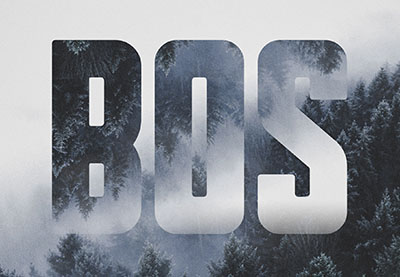
In the tutorial we’re going to see how to use an image texture, with clipping and layer masks, as well as simple brushes and filters in Adobe Photoshop to create a mirror text effect inspired by a landscaped environment.
Related Posts
18
Feb2013
Create Simple Origami Style Typography in Illustrator
In the exercise that we are going to follow you will learn how to create a simple Origami-style text using the Adobe Illustrator vector graphics program. You will create a…
08
May2013
Create a Medieval Landscape in Photoshop
Nel tutorial che vedrete viene spiegato come creare un paesaggio medievale con la pittura digitale e tecniche di manipolazione delle foto. La lezione inizia col delineare un bozzetto di come…
02
Nov2013
Creating an Old TV Footage Effect in After Effects
In this video tutorial we will see how to recreate the effect of images seen with an old TV in After Effects. A lesson certainly already seen, but in this…
06
Jun2017

Draw a Simple Octopus Vector Logo in Illustrator
In this simple and fast video tutorial we will see how to make a simple vector logo with a cute cyclops octopus using the Adobe Illustrator graphics program. A lesson…
17
Sep2014

Creating Text Wave Effect in Cinema 4D – Tutorial
This video tutorial shows us how to create an impressive text wave effect in Cinema 4D. The whole thing will then be inserted into a composition in After Effects to…
05
Mar2015

Create a Simple Vector Bar Chart in Adobe Illustrator
Nei passi del tutorial che andremo a vedere imparerete come creare un semplice grafico a barre in Adobe Illustrator. Per cominciare imparerete come impostare una semplice griglia e come creare…
